How to scan your WordPress site for cookies (free)
Run a free cloud cookie scan of your WordPress site: what is set before any choice, after Reject all and after Accept all, and pages without the banner.
On this page
A cookie scan answers one question: what does your site store in a visitor’s browser, and when? Omea Consent has two scanners. The cloud scan visits your site from the outside, like a first-time visitor in the EU – the way a data protection authority would. The local scan runs in your own browser. Your first cloud scan is free.
Run a cloud scan
- Open the Scanner Go to Omea Consent › Scanner.
- Start the cloud scan In the Cloud scan card click Run free cloud scan. It takes about 1–2 minutes and covers up to 10 pages. You can leave the page – the result is saved when you come back.
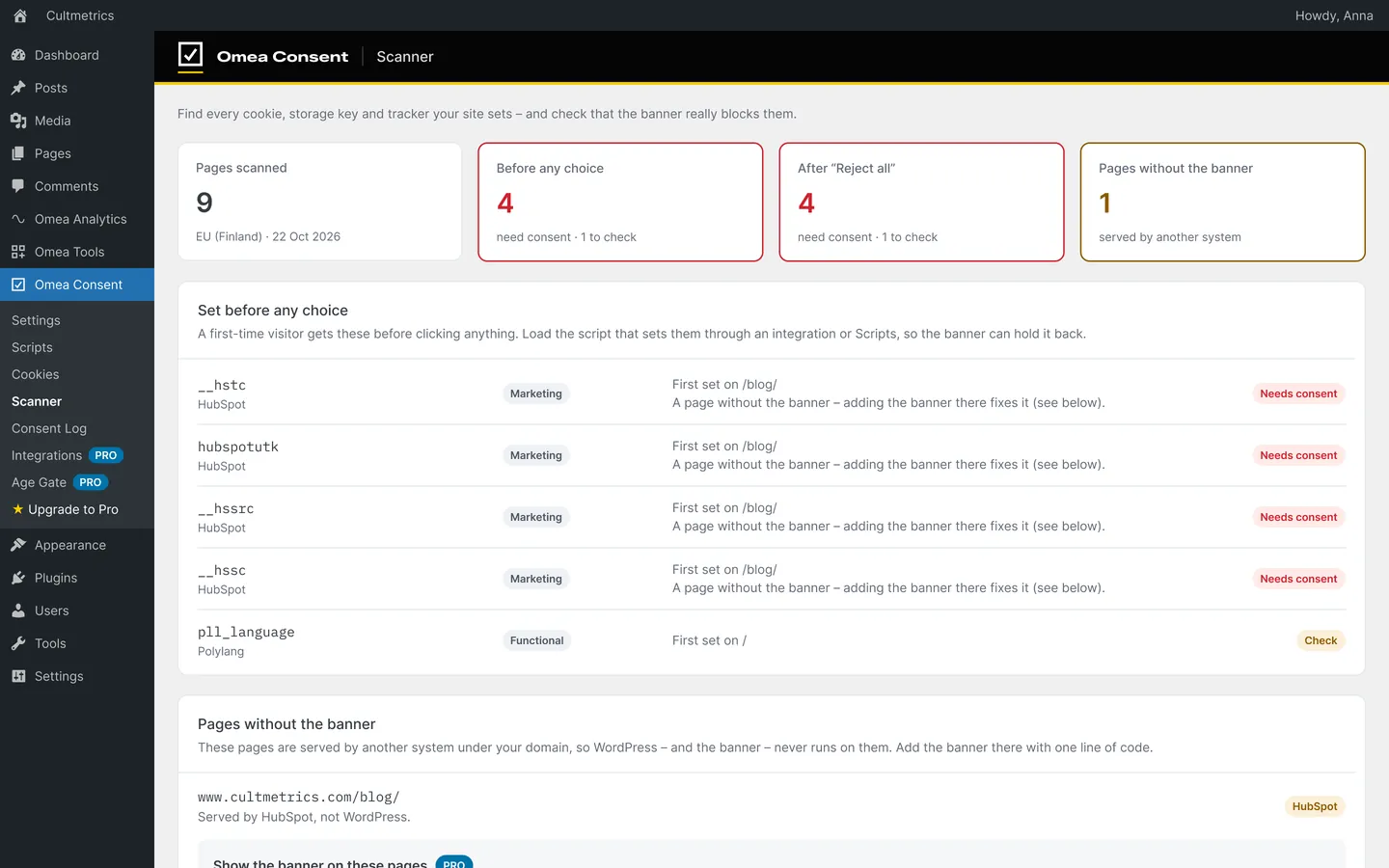
- Read the result Check the four tiles: Pages scanned, Before any choice, After “Reject all” and Pages without the banner. Anything marked Needs consent must be fixed.
- Fix what was found Move tracking code into Scripts, or turn on auto-blocking for code from your theme and other plugins.
- Review the cookie table Click Open cookie table. Everything that loaded after Accept all has been added with a category, purpose, provider and duration.
What the cloud scan checks
Cultmetrics’ scanner in the EU loads up to 10 public pages of your site three times:
| Moment | What must be true |
|---|---|
| Before any choice | Only necessary cookies may be set. |
| After “Reject all” | Statistics and marketing must stay off. |
| After “Accept all” | Everything that loads gets a category and a description. |
| Pages without the banner | Finds pages another system serves on your domain – a HubSpot blog or landing pages, for example. |
Findings that need consent (statistics or marketing) are marked red as Needs consent; functional ones are orange as Check.
Cloud scan or local scan?
| Cloud scan | Local scan (Beta) | |
|---|---|---|
| Runs from | Cultmetrics’ scanner in the EU | A hidden frame in your own browser |
| Sees | What a brand-new visitor gets, including cookies set by your CDN | What you get while logged in – can miss cookies set only for new visitors |
| Checks reject and accept | Yes, all three moments | No |
| Pages | Up to 10 | One URL, or Scan whole site: the home page plus the 20 most recently changed pages and posts |
| Limit | 1 free scan; unlimited with Pro | Unlimited |
Use the local scan for quick checks while you work, and the cloud scan to confirm the result.
What is sent to Cultmetrics
Nothing is sent until you click. Then the plugin sends your site’s home URL, the plugin version and a one-time token. The scanner returns cookie names and settings, storage keys, script addresses and third-party hosts – never cookie values. The result is kept for 90 days.
After the scan
- Cookies before any choice or after “Reject all”: move the code into Scripts, or turn on auto-blocking.
- Pages without the banner: with Omea Consent Pro you can show the banner on pages outside WordPress with one line of code.
- Cookie table: review it under Omea Consent › Cookies, then publish a cookie policy.
Scan every month
The free plugin includes one cloud scan per site. Omea Consent Pro runs one every month and emails you when a new cookie shows up before consent.
Optional: CookieDatabase.org lookups
Cookie descriptions come from a local copy of the Open Cookie Database bundled with the plugin. Under Settings › Advanced you can also turn on CookieDatabase.org lookups, which sends detected cookie names to CookieDatabase.org during admin scans to fill in purpose, provider and duration. It is off by default and never affects visitors.