Cookie consent records: how to prove consent (GDPR)
Keep proof of cookie consent under GDPR art. 7(1) with Omea Consent's free consent log: what is stored, search by consent ID, CSV export and retention.
On this page
GDPR article 7(1) says that where processing is based on consent, you must be able to demonstrate that the person consented. For cookies, that means keeping a record of each choice made on your banner. Omea Consent does this for free, on your own site.
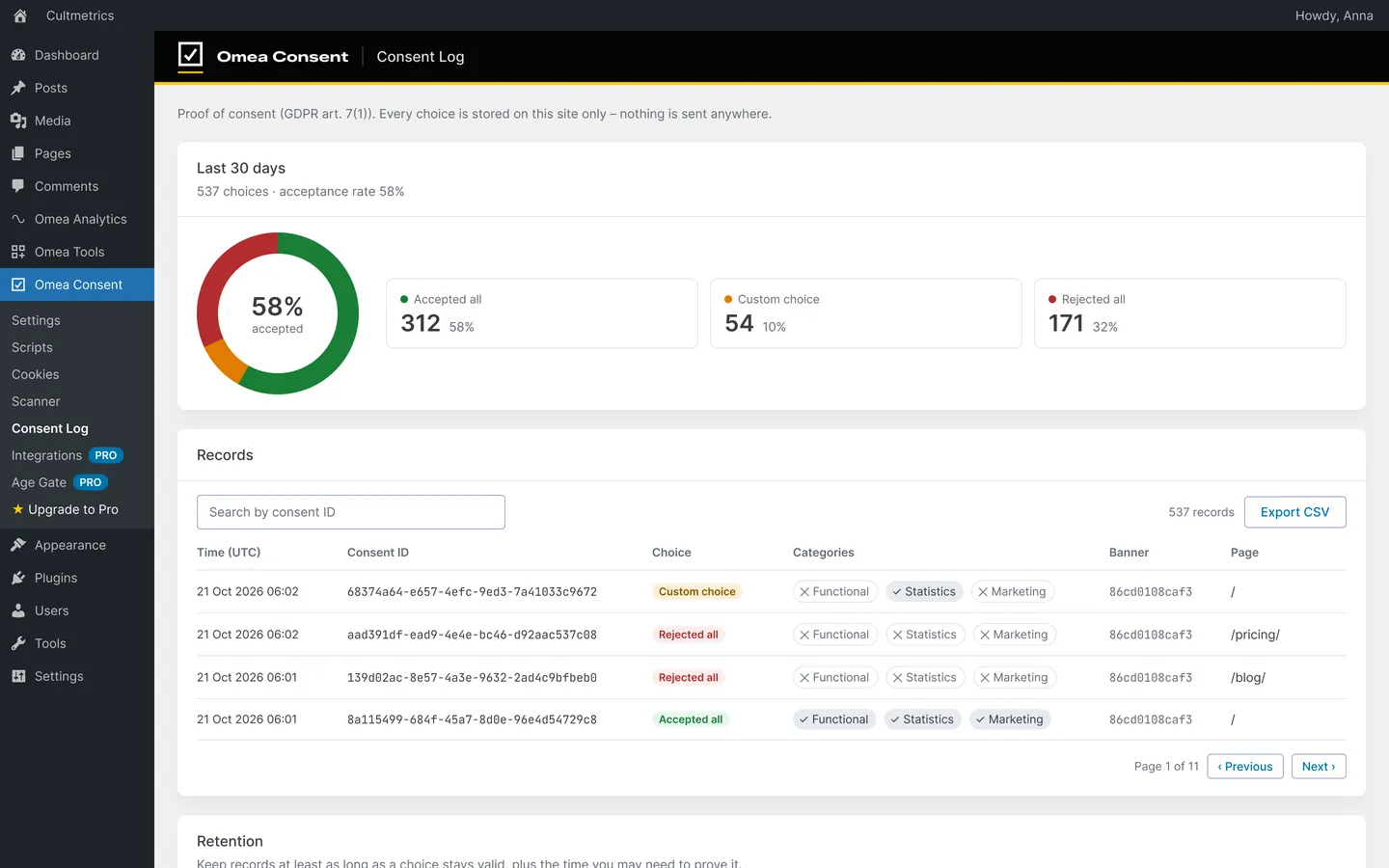
What each record contains
| Field | Example | Why |
|---|---|---|
| Time (UTC) | 2026-10-22 09:14 | When the choice was made |
| Consent ID | a random UUID | Links the record to the visitor’s browser (they can see it in the preferences window) |
| Choice | Accepted all, Rejected all or Custom choice | Worked out on the server from the categories |
| Categories | Functional ✓, Statistics ×, Marketing × | What exactly was allowed |
| Banner | a 12-character version code | Which banner texts and categories the visitor saw |
| Page | /pricing/ |
Where the choice was made |
| IP hash | salted hash of the anonymised IP | Spots abuse without storing the address |
The banner version matters: if you later change the wording, you can still show which text a visitor agreed to.
Find and export records
Open Omea Consent › Consent Log:
- Last 30 days shows how many choices were made and the acceptance rate, split into Accepted all, Custom choice and Rejected all.
- Search by consent ID finds one visitor’s records. Visitors see their ID at the bottom of the preferences window as Your consent ID.
- Export CSV downloads every record (
time_utc,consent_id,choice,categories,banner_version,page,ip_hash). The export is protected against spreadsheet formula injection.
How long to keep records
The GDPR sets no fixed period. A sensible rule, and the one the plugin suggests: keep records at least as long as a choice stays valid, plus the time you may need to prove it.
Set it under Retention on the Consent Log screen: Delete records older than [N] days (default 365, between 30 and 3,650), then Save retention. A daily WordPress cron job deletes older records. If your retention is shorter than the consent validity under Settings › Policies, the screen warns you.
Privacy of the log itself
- Records are stored only in your WordPress database – nothing is sent to Cultmetrics or anyone else.
- No raw IP addresses are stored.
- The log endpoint (
POST /wp-json/omea-consent/v1/consent) accepts at most 30 records per visitor per 10 minutes, and it counts the real visitor IP behind proxies and CDNs. - A suggested paragraph for your privacy policy is added under Settings › Privacy in WordPress.
Frequently asked questions
Is the consent log sent to Cultmetrics?
No. Records are stored in a table in your own WordPress database and never leave your site.
Does the consent log store IP addresses?
No. It stores a salted hash of the anonymised IP address, which can’t be turned back into the address.
How do I find a visitor's record?
Ask them for the consent ID shown at the bottom of the preferences window (open it from the cookie icon), then search for it under Omea Consent › Consent Log.
Why doesn't every page view create a record?
A record is created when a choice is made or changed. Saving the same choice again doesn’t add a duplicate.